Whooli CTF NEW
Break a fake unicorn before breakfast.
Whooli is a fake billion-dollar tech unicorn we built to get pwned. It's a full GitHub organization stuffed with booby-trapped workflows, leaked deploy keys, hardcoded secrets, and a homebrewed AI triage bot begging to be hijacked. Point SmokedMeat at it, walk the full kill chain from a drive-by GitHub Issue comment to cloud admin, and learn exactly how modern CI/CD gets owned.
It pairs with our open-source CI/CD red team framework SmokedMeat and the poutine scanner. Everything is intentionally vulnerable, and everything you steal is fake.
Threat Model your YAML.
CI/CD is RCE-as-a-Service. Every workflow in .github/workflows/ is a remote shell with a permission set and a blast radius. Most teams audit application code line-by-line and skim their pipeline YAML once, at review time, and never again.
Whooli exists so you can feel what that gap costs, against a target you're allowed to break. Two principles get hammered home end-to-end:
- Least privilege. A workflow token with
contents: readdoesn't pivot to your cloud. Every write-scoped permission is a potential escalation path depending on context:contents: writepluspull-requests: writecan push to protected branches via a malicious PR merge or tamper with release artifacts, andid-token: writeis a flashing sign that the workflow is a trusted workload allowed to trade an OIDC token for cloud or external identity, usually exactly the pivot an attacker is hunting for. Any workflow secret in scope (cloud creds, registry tokens, npm publish keys) is fair game the moment RCE lands, so default to read-only and add permissions back explicitly. - Limit blast radius. Even tight permissions don't stop a compromised workflow from reaching further than you think.
actions: writeturns a low-trust runner into a beachhead against your high-trust pipelines (poisoned caches, dispatched workflows). A forgotten GitHub App private key in the loot, an OIDC trust policy that's too generous, or a deploy job that shares a runner pool with PR builds all turn one bad GitHub Issue comment into prod.
Whooli is safe to break. Everything you steal is synthetic and the org has no real users, customers, or production. Only ever run SmokedMeat against systems you own or have explicit written authorization to test.
git clone https://github.com/boostsecurityio/smokedmeat.git
cd smokedmeat
make quickstart
# When prompted for a target org, enter: whooliWant the long-form tour first? Read the SmokedMeat launch post and the step-by-step tutorial. When you're ready to run it against your own org, start with a poutine scan to surface the misconfigurations SmokedMeat will happily exploit.
The demo below is the full kill chain against Whooli: from "anonymous attacker can comment on a public issue" to "attacker reads flag.txt out of a private Google Cloud Storage bucket." End-to-end, under three minutes.
SPOILER ALERT Full walkthrough & 11-step kill chain. Want to solve Whooli yourself? Skip this block. [ click to reveal ]
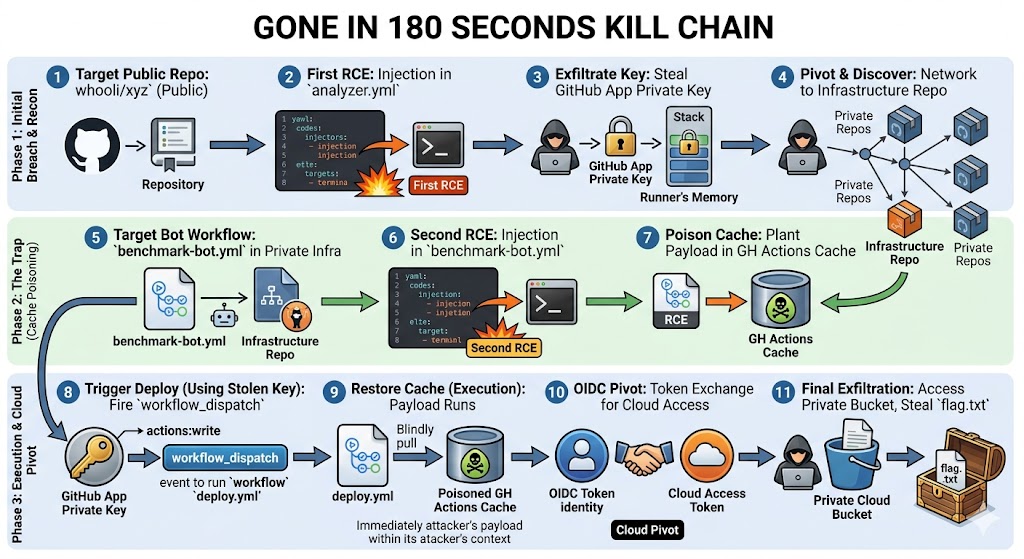
Phase 1: initial breach & recon
- Target the public org. Start by looking at
github.com/whooli. It's a normal-looking GitHub org with a handful of public repos, a few private ones you can't see yet, and a benign-looking analyzer bot. - Bring SmokedMeat up. Clone
smokedmeat, follow the quick-start, and runmake quickstart. It spins up a stack of Docker containers, including a tunnel container that gives the attacker an externally-reachable callback URL with zero firewall fiddling. - Authenticate and pick a target. SmokedMeat asks for a GitHub Personal Access Token (yours, used only to read public data and post the eventual injection) and the target org name. We point it at
whooli. - First RCE: a workflow injection. The embedded poutine scan flags vulnerabilities in
whooli/xyz's public workflows and highlights the most likely to land. We pick an injection inanalyzer.yml. SmokedMeat drops the payload into an issue comment, which triggers the workflow. Roughly 20 seconds later the runner phones home. - Loot the runner. Switch to the post-exploit view. The Loot Stash contains the secrets that were in scope of that workflow, including a GitHub App private key. That's the pivot.
Phase 2: pivot, discover, set the trap
- Pivot with the GitHub App. SmokedMeat exchanges the stolen private key for App installation tokens and re-runs reconnaissance with the new identity. Suddenly the attack graph fills in: previously-invisible private repos appear, including the infrastructure repo where deploys actually happen.
- Find the next vulnerable workflow. Inside the infra repo,
benchmark-bot.ymlhas its own injection sink. That gives us a second RCE, but in a higher-trust context: the same runner pool that builds and deploys the production app. - Pick the real prize. What we actually want isn't
benchmark-bot.yml: it's thedeploy.ymlworkflow, which holds the OIDC trust to Google Cloud. We're going to reach it via cache poisoning. - Poison the GitHub Actions cache. Configure the target (
deploy.yml), flush its current cache so we know what we're replacing, then arm dwell mode for ~2 minutes. Through the second RCE, SmokedMeat writes a malicious cache entry keyed exactly the waydeploy.ymlwill request it on its next run.
Phase 3: execution & cloud pivot
- Fire the deploy. Using the App private key we stole back in Phase 1 (it has
actions: write), we send aworkflow_dispatchto kick offdeploy.yml. The workflow restores the cache we just poisoned, and our payload runs inside the post-checkout phase, in the deploy job's context. - Pivot to the cloud over OIDC. The deploy job is allowed to exchange its workflow OIDC token for a Google Cloud access token. SmokedMeat does that exchange, and now we have a real cloud identity.
- Steal the flag. Drop into a cloud shell, list buckets, find the private one with the flag inside, and read
flag.txt. Game over: a single anonymous GitHub Issue comment turned into cloud-side data exfiltration.
- Untrusted input +
pull_request_target/issue_comment= RCE. Pwn requests aren't theoretical, they're the entry point. - Secrets in the runner are secrets in the loot. Anything a workflow can read, the implant can read. GitHub App private keys are the highest-value loot because they re-issue tokens at will.
- Private repos are not a security boundary. Once you have an App installation token, the org's visibility settings stop mattering.
- Caches are remote-write code. A GitHub Actions cache that any contributor's workflow can populate is, in effect, a deployable artifact. Treat it that way.
- OIDC is a privilege escalator if the trust policy is loose. Scope cloud-side trust policies to a specific workflow file path and ref, not just the repo.
- Detection lags exploitation. The whole chain runs faster than most SIEM pipelines re-index. Prevention > detection for this class of attack.