Weaponizing Dependabot: Pwn Request at its Finest

Sébastien brings Red Team expertise to the research team and is a major contributor to the Living Off The Pipeline (LOTP) project. An avid CTF player who has won several prestigious competitions, he specializes in offensive CI/CD exploitation techniques and turning theoretical attack patterns into practical demonstrations.
TL;DR: Your trusty Dependabot (and other GitHub bots) might be an unwitting accomplice. Through “Confused Deputy” attacks, they can be tricked into merging malicious code. This doesn’t stop here. It can escalate to full command injection via crafted branch names and even bypass branch protection rules. Plus, we disclose two new TTPs to build upon previously known techniques.
Introduction
Dependabot is GitHub’s built-in dependency management tool. It monitors your dependencies and opens PRs when updates are available. In this post, we break down not only the attack surface but also the latest Dependabot behavior developers need to understand, including how it can become a vector for confused deputy attacks.
Meet Dependabot: Your Automated Dependency Butler
Dependabot is configured via a .github/dependabot.yml file (see the Dependabot options reference).
Once active, Dependabot periodically scans your repository according to its config file. It also re-scans when you modify this file or trigger it manually via the https://github.com/<Owner>/<Repo>/network/updates tab.
When Dependabot detects an outdated dependency, it runs a workflow (visible as “Dependabot Updates” in your Actions tab), creates a new branch (typically named dependabot/<module_type>/<registry>/<package_name>/<new_version>), and opens a Pull Request to your default branch.
The “Confused Deputy” Problem
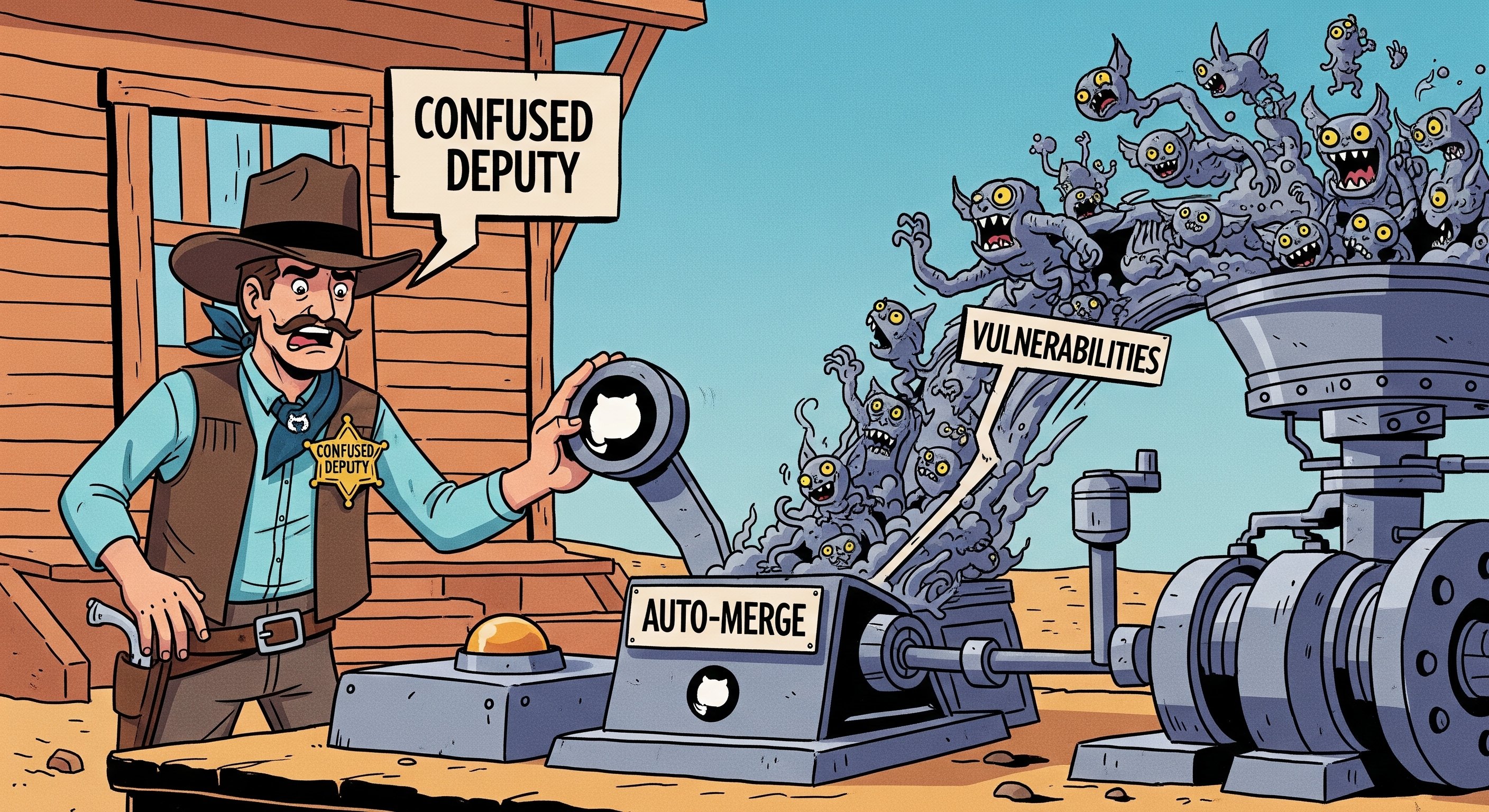
The confused deputy problem (CWE-441) describes a vulnerability class where a trusted party (the “deputy”) is manipulated by an attacker into performing an unintended action.
Some workflows are sensitive because they carry special permissions or access to secrets. Many developers added a user identity check at the start of these workflows to ensure they were triggered by a trusted actor. This becomes especially dangerous when attackers exploit commands like @dependabot recreate, which can reset a branch and bypass safeguards if workflows are misconfigured.
Since manually approving every Dependabot PR can be tedious, many teams created workflows to auto-merge PRs when the creator is Dependabot. Something like this:
on: pull_request_target
jobs:
  auto-merge:
    runs-on: ubuntu-latest
    if: ${{ github.actor == 'dependabot[bot]' }}
    steps:
      - run: gh pr merge --auto -d -m
This looks safe. After all, Dependabot is trusted, and an attacker cannot directly force it to open a PR on a repository they do not control. The problem is that github.actor does not always refer to the actual creator of the Pull Request. It refers to the user who caused the latest event that triggered the workflow.
So, if an attacker can force Dependabot into making a change that triggers this auto-merge workflow, they can merge their own malicious code.
An attacker cannot directly command Dependabot on a repository they do not have access to. What they can do is look at the events Dependabot is able to trigger:
| Event | Action | From fork | Command |
|---|---|---|---|
pull_request_target, pull_request | When creating or updating a pull request. | true | @dependabot recreate |
issue_comment | When showing information. | false | @dependabot show <dependency name> ignore conditions |
push | When pushing to the branch, when merging etc. | false | @dependabot merge |
create | When creating a new branch. | false | N/A |
delete | When deleting a branch. | false | @dependabot close |
workflow_run | Triggered as a side-effect of another workflow running or completing. | true | Relevant if the parent workflow was triggered using one of the above commands. |
The key observation here: Dependabot can be forced to update a Pull Request, even one originating from a fork.
The attack unfolds as follows:
- Fork the target: Attacker forks a repository that has one of these “auto-merge if Dependabot” workflows.
- Inject the payload: Attacker adds their malicious payload to the default branch of their fork.
- Activate Dependabot: Attacker enables Dependabot on their fork and adds an obviously outdated dependency to trigger it (often this pre-requisite is already met from the time of forking).
- Dependabot creates its branch: Dependabot creates an update branch on the fork. Because this branch is based on the fork’s default branch, it now includes the attacker’s payload (through the refs/pulls/ read-only namespace).
- Open the PR: Attacker creates a Pull Request from this Dependabot branch on their fork, targeting the original (victim) repository.
- Workflow triggers but does not merge: The auto-merge workflow fires in the victim repo. At this point
github.actoris the attacker, so theifcondition fails and nothing is merged. - Invoke the deputy: Attacker goes back to the original Pull Request in their fork that Dependabot opened and comments
@dependabot recreate. - Dependabot recreates its branch: Dependabot force-pushes the changes. This triggers the vulnerable
pull_request_targetworkflow again, this time with thesynchronizeevent. - Merge: Now
if: ${{github.actor == 'dependabot[bot]'}}is true. The workflow merges the attacker’s code.
The attacker has bypassed user verification by using Dependabot as their confused deputy. This technique was originally discovered and documented by Hugo Vincent in GitHub Actions Exploitation: Dependabot. It is not theoretical. This exact attack pattern was exploited in the December 2024 Kong Ingress Controller attack and, using Boost Security’s own Package Supply infrastructure, we continue to find instances at scale in mission-critical open source projects.
Level Up: Dependabot Deputy Confusion Injection
The attack above can be considered a Pwn Request variant without RCE (if you are not familiar, see our previous article Exploiting CI/CD with Style(lint): LOTP Guide). But it can go further. Beyond untrusted code checkout, the other common build pipeline exploitation technique is injection (as covered in Opening Pandora’s box - Supply Chain Insider Threats in Open Source projects). The most common variant: injecting a maliciously crafted Git branch name.
Consider this simplified workflow snippet:
on: pull_request_target
jobs:
  just-printing-stuff:
    runs-on: ubuntu-latest
    if: ${{ github.actor == 'dependabot[bot]' }}
    steps:
      - run: echo ${{ github.event.pull_request.head.ref }}
The ${{github.event.pull_request.head.ref}} expression is the branch name the PR is coming from, inserted directly into the run script. If an attacker names their branch something like $(id), that command gets executed.
In the normal Dependabot deputy confusion scenario, the head.ref is Dependabot’s own branch, which follows a strict naming convention (dependabot/<ecosystem>/...). Renaming that branch directly causes Dependabot to stop pushing to it, which breaks the pull_request_target synchronize trigger needed for the attack.
One might conclude that Dependabot deputy confusion is immune to injection. It is not. Boost Security’s research team (along with participants during a Hackathon we organized) uncovered two distinct ways to achieve injection here. This is a previously undisclosed TTP we developed in fall 2024, used in several high-profile bug bounty responsible disclosures:
- The Merge Conflict Tango
The(Deprecated: the@dependabot mergeShuffle with a Custom Default Branch@dependabot mergecommand was removed by GitHub on January 27, 2026. See the Deprecated Techniques section below.)
Technique 1: The Merge Conflict Tango
This method lets an attacker rename Dependabot’s branch without severing its connection to it. It is somewhat unstable but fully repeatable and scriptable.
Steps:
- Setup: Fork the target repo (with the vulnerable workflow), enable Dependabot, and get it to create its update PR and branch.
- Create a conflict: On your fork, introduce a file with the same name but different content on both Dependabot’s branch and your fork’s default branch. This manufactures a merge conflict.
- Preserve Dependabot’s original change: Identify which file Dependabot changed (visible in its PR). Revert that specific change on Dependabot’s branch by uploading the original version from the default branch. This prevents Dependabot from considering its job done and closing its PR.
- Switch the default branch: Change the default branch of your forked repository to Dependabot’s branch.
- Trigger conflict resolution: Navigate to the newly conflicted Pull Request (the one Dependabot opened). GitHub’s UI will offer to help resolve the conflict.
- Use the rename dialog: Fix the conflict. When you click “Commit merge,” you will see a dialog: “Commit updates to the … branch” OR “Create a new branch and commit updates. Your pull request will be updated automatically.” (This dialog was not something we had encountered before developing this TTP. Thanks @AdnanKhan for the hint.)
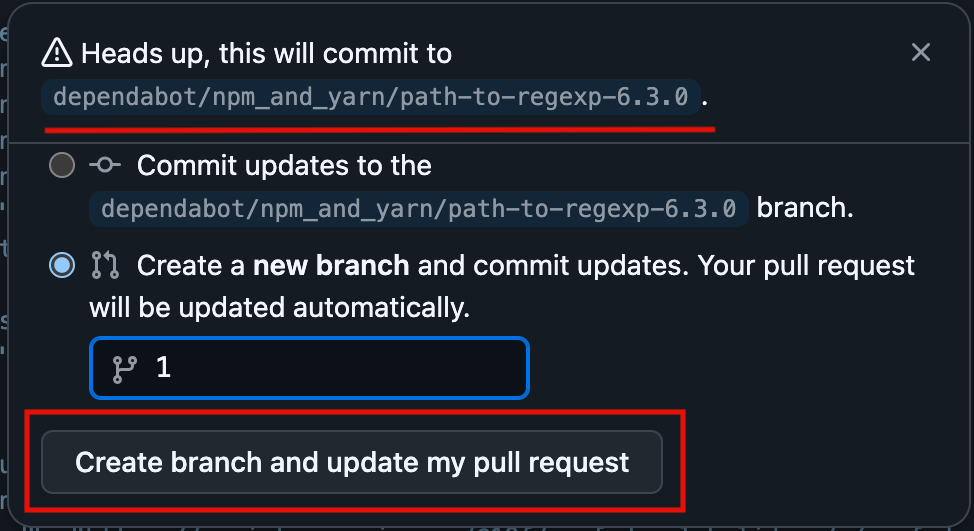
- Name the payload branch: Choose option two. Name this new branch with your desired payload (e.g.,
foo-$(id)-bar). - Open the victim PR: Create a new Pull Request from this payload-named branch, targeting the original victim repository. This triggers the workflow, but
github.actoris still the attacker, so the job is skipped. - Trigger via
@dependabot recreate: Comment@dependabot recreateon the original Dependabot Pull Request. - Execution: Dependabot recreates and force-pushes to your payload-named branch (because its PR now points there). This triggers
pull_request_targetwithsynchronize,github.actorisdependabot[bot], and your injected branch name is executed.
Some characters are off-limits for branch names:
#: Tends to crash Dependabot (bug hunting left as an exercise to the reader - some old GHSA might be of interest).*,:,?,[,\,^,~: GitHub filters these out from branch names.
Why Pick on Dependabot?
What makes Dependabot the prime candidate for these deputy confusion attacks? Not much that is unique to it specifically. It comes down to three factors:
- It is trusted.
- It is controllable (by anyone, indirectly).
- Teams strongly want to automate it.
Other bots can be similarly confused. Dependabot is simply popular and deeply integrated into GitHub. Any public GitHub App that performs actions in a repository, and that users might want to automate via GitHub Actions, is potentially vulnerable to a deputy confusion attack.
Using our recently publicly discussed OSS Package Threat Hunting infrastructure, we identified a list of bots that look like prime candidates for similar attacks. More details will follow in an upcoming article.
How can I protect myself?
While these scenarios may not be as common as other Pwn Request flavors, they have appeared in critical projects and large organizations.
Detection
You can use Boost Security’s build pipeline static analysis scanner, poutine (available on GitHub), which recently gained an open-sourced rule for detecting these kinds of vulnerabilities. See the Confused Deputy Auto-Merge rule.
Prevention
To avoid deputy confusion, you need to be careful about which GitHub context variables you trust, particularly with events like pull_request_target.
Here is a quick reference:
Confusable or Forgeable Contexts (Approach with Extreme Caution)
| Event | Activity type(s) | Confusable/Forgeable Elements |
|---|---|---|
pull_request_target | synchronize | github.actor, github.triggering_actor, github.actor_id, github.event.sender.login, github.event.pull_request.sender.id |
workflow_run | Any without branches filter | github.actor, github.triggering_actor, github.actor_id, github.event.sender.login, github.event.sender.id, github.event.workflow_run.actor.id, github.event.workflow_run.actor.login, github.event.workflow_run.triggering_actor.id, github.event.workflow_run.triggering_actor.login |
workflow_run | Any without branches filter | github.event.workflow_run.head_commit.author.name, github.event.workflow_run.head_commit.author.email |
Most likely NOT confusable
| Event | Activity type(s) | Safer Elements to Check User Identity |
|---|---|---|
pull_request_target | NOT synchronize | github.event.pull_request.user.login, github.event.pull_request.user.id |
Other events such as pull_request, issue_comment, push, create and delete cannot be triggered by Dependabot as an external user from a fork.
To prevent branch protection bypasses
If Dependabot must have bypass privileges, ensure that Dependabot’s own branches (e.g., dependabot/**) are also protected with restrictions matching your main protected branch. This prevents an attacker (including an insider threat) from pushing to Dependabot’s branch and using it as a vehicle for merging malicious code.
Auto-merge
Some community Actions handle Dependabot merges more securely by verifying Dependabot’s identity or using its dedicated commands:
dependabot/fetch-metadata- fastify/github-action-merge-dependabot
- ahmadnassri/action-dependabot-auto-merge
These are safer alternatives to rolling your own auto-merge logic.
Want to Get Your Hands Dirty?
We set up a purposely vulnerable GitHub organization for exactly this: MessyPoutine.
Check out the gravy-overflow repository.
The workflow .github/workflows/level3.yml named Poutine Level 3 contains a prime example of deputy confusion waiting to be exploited.
Deprecated Techniques
Update (January 2026): GitHub removed several Dependabot comment commands on January 27, 2026, including
@dependabot merge,@dependabot cancel merge,@dependabot squash and merge,@dependabot close, and@dependabot reopen. Technique 2 below relied on@dependabot mergeand no longer works. It is preserved here for historical reference.
Technique 2: The Default Branch Merge Shuffle
This technique was developed by participants at the Montréhack hackathon of May 2025 while playing the second round of our MessyPoutine CTF.
The approach was more straightforward than Technique 1:
- Standard setup: Fork, enable Dependabot, let it create its branch and PR.
- Craft the payload branch: On your fork, create a new branch named with your payload (e.g.,
branch-$(id)-inject). - Swap the default branch: Change the default branch of your forked repository to this payload-named branch.
- Open the victim PR: Create a Pull Request from this new payload-named default branch, targeting the victim repository. Again,
github.actoris the attacker, so the job is skipped. - Issue
@dependabot merge: Go to the original Dependabot PR and comment@dependabot merge. - Execution: Dependabot would merge its own changes into what it considered the standard default branch. Because the default branch was swapped, it merged into the payload-named branch instead. This merge event triggered
pull_request_targetwithsynchronize,github.actorwasdependabot[bot], and the malicious branch name (nowgithub.event.pull_request.head.ref) was executed by the vulnerable workflow step.
The removal of @dependabot merge closes this specific attack path. Technique 1 (The Merge Conflict Tango) remains
valid.
Bypassing Branch Protection
What else can a confused Dependabot be coerced into doing? Sidestepping branch protection rules.
Branch Protection lets you restrict who can push to important branches (like main or release branches), require reviews, and so on. For instance, you might only allow maintainers to push directly by adding them to an “allow bypass” list.
If projects have auto-merge workflows for Dependabot PRs, and branch protection is enabled on the target branch, Dependabot itself often needs to be on that bypass list.
If an attacker gains contents: write permission (perhaps through an insider threat, Personal Access Token or SSH key theft, or a second-order workflow attack on the victim repository itself), they can potentially bypass branch protection:
- Prerequisites: The attacker has
contents: writeon the target repository, Dependabot is on the Branch Protection (or Repository Ruleset) bypass list for the default branch, and there is a legitimate Dependabot PR already open. - Malicious push: Attacker pushes their desired payload directly to Dependabot’s branch in the target repository.
- Issue the command: Attacker comments
@dependabot mergeon Dependabot’s PR (using the identity withcontents: write). - Bypass achieved: Dependabot, using its bypass privileges, merges its (now malicious) branch into the protected default branch.
One wrinkle: Dependabot does not accept commands from GitHub Apps (see issue #9147). So how can an attacker send the @dependabot merge command?
- Compromised PAT: If an attacker obtained a Personal Access Token with the necessary permissions, they can post the comment directly.
- TOCTOU with
GITHUB_TOKEN: If aGITHUB_TOKENis compromised, the attacker may need to win a Time-of-Check-vs-Time-of-Use race. They wait for a legitimate user to comment@dependabot merge, then push their malicious code to Dependabot’s branch before the merge completes. Merges taking 20 seconds or more have been observed, which is enough time. We have successfully used the ActionsTOCTOU tool for this kind of scenario.
Frequently Asked Questions
What is the latest Dependabot news for developers? Researchers have shown that even automated dependency updates can become security risks if workflows are misconfigured. Attackers can exploit deputy confusion attacks to trick GitHub workflows into merging malicious code.
How does @dependabot recreate PR work? When you comment @dependabot recreate PR, Dependabot deletes its current branch and creates a new one with the latest updates. In misconfigured workflows, this can be abused by attackers to reset checks or bypass manual reviews.
Why is @dependabot recreate PR considered a security risk? The @dependabot recreate PR command can reopen or rewrite pull requests in ways that retrigger automated workflows. If those workflows auto-merge without strict validation, attackers can use it to push malicious code into trusted branches.
Where can I follow real Dependabot news about security exploits? You can follow Dependabot security research on GitHub’s official blog, security research publications, and independent researchers like Boost Security. These sources share updates on vulnerabilities, exploits, and new protection methods.
How do I protect my repo from @dependabot recreate PR exploits? Avoid using unsafe conditions like if: github.actor == 'dependabot[bot]' alone. Instead, verify PR sources, use tools like dependabot/fetch-metadata, and monitor new Dependabot news for emerging attack techniques.